Stop Automating Bad Processes: The Essential Difference Between Automation and AI
I spent three days in an “AI strategy” workshop that ended with…plain automation. No real change in how we worked. Just a plan to push the same slow steps through a faster pipe. It reminded me how often teams mix up automation and AI — and how that mix-up drains time, money, and trust.
“If your process is broken, automating it just helps you make mistakes faster.”
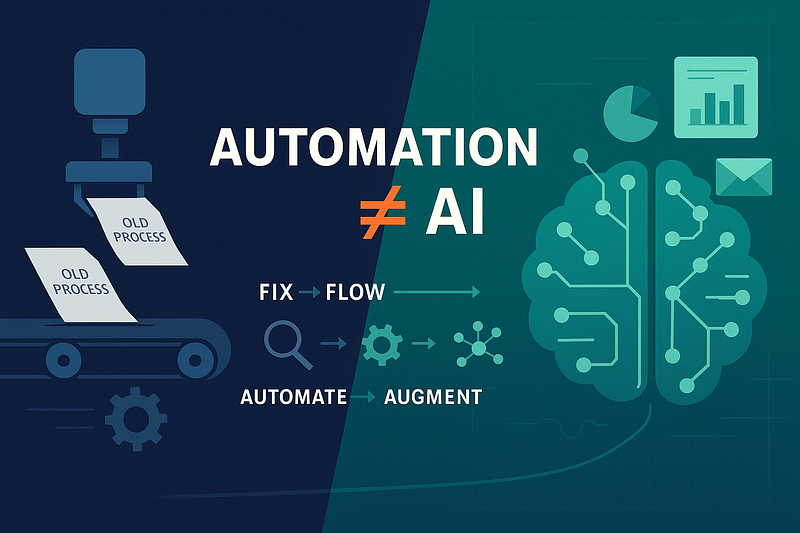
Automation ≠ AI
Automation runs on rules. Clear triggers, clear outputs. It’s good for repeat steps, data handoffs, alerts, and form updates.
AI works from patterns. It handles messy inputs, learns from past examples, and can sort, summarize, predict, and draft. It can read unstructured files, suggest next steps, and spot risks that simple logic can’t.
Both matter. They do different jobs.
The common miss: paving the cow path
A lot of leaders buy tools that copy what they already do, only quicker. That locks in old decisions and spreads waste across the system. The demo looks smooth, but that doesn’t mean it’s smart.
Before you automate, ask: Is this even the right process? If not, you’re just smoothing a rough trail.
A sequence that works
Audit — Map the work from the student/patient/customer view. Where are the waits? Where do things bounce backward? Which choices actually matter?
Improve — Cut steps that add nothing. Standardize inputs. Clarify who decides what. Fix handoffs.
Automate — Use rules to remove swivel-chair tasks: data entry, routing, status notes, routine checks.
Add AI — Bring AI in when things get fuzzy: sorting open-text requests, pulling data from messy documents, turning long records into workable notes, spotting demand or risk, suggesting next steps with human review.
Think of it as: Fix → Flow → Automate → Augment.
How to pick the right tool
Clear rules and structured data? Use automation.
Messy inputs and judgment calls? Add AI.
High stakes? Keep humans in place and define how they step in.
A few steady examples
Student services/customer support
Automation: Forms route to the right queue; milestones trigger status messages.
AI: Sorts messages by intent, drafts replies, and gives staff a short case summary so they don’t read a whole chain.
Finance & operations
Automation: Match invoices to POs; push clean entries into the ledger.
AI: Flags odd spending, predicts late payments, and pulls line items from inconsistent invoice formats.
HR & talent
Automation: Start the right onboarding steps by role.
AI: Sorts applicants by skill, condenses interviews, and warns when retention might slip.
Governance that helps instead of blocking
Process owner + product owner — Someone owns the outcome; someone owns the tool. Sometimes, both hats fit one person.
Data readiness — Know where truth lives, who can touch it, and how long you keep it. Bad data breaks everything.
Human-in-the-loop — Decide which steps need review, what “good enough” means, and how you’ll check quality.
Risk & ethics — Write down use cases, data sources, limits, and checks. Make it easy to audit.
Metrics that matter
Process: cycle time, first-pass yield, cost per case, number of touches.
Automation: hours removed, error rate before/after, exceptions per 100 cases.
AI: accuracy compared to baseline, forecast lift, human quality scores, time-to-decision.
If cycle time, quality, or satisfaction don’t move, you didn’t change the process — you just added scripts.
A 30–60–90 day plan
Days 0–30: Shared language + visibility
- Agree on what automation and AI mean.
- List your top 10 workflows by volume or impact.
- Pick two pilots: one for automation, one for AI. Capture baseline metrics.
Days 31–60: Redesign + early wins
- Strip out redundant steps.
- Ship small automations: routing, updates, checks.
- Prep AI inputs: clean samples, label a truth set, set acceptance rules.
Days 61–90: Pilot + publish
- Launch the AI pilot with human review.
- Track metrics weekly and clean up edge cases fast.
- Publish a one-page case study and a reusable guide.
- Then move to the next workflow.
Five questions leaders should keep asking
- What problem are we solving for the end user, in their words?
- What waste are we removing before we add tech?
- Which steps are rule-based, and which are ambiguous?
- Where does a human add judgment, and how do we design that moment?
- How will we measure the effect and decide to scale, pause, or stop?
Automation handles the routine. AI expands what you can do. Use both — but in order. Fix the process, smooth the flow, automate the rules, then add AI where the work gets messy. That’s how you create value instead of theater.